Polygon to Arbitrum USDC bridge


Moving $1,000 USDC from Polygon to Arbitrum costs about $0.67 in fees and typically arrives in ~1 min. Circle's CCTP mints native USDC on Arbitrum: no wrapped token, no slippage, and no POL needed for gas in a sendstables wallet.
- Fees on $1,000
- about $0.67Quote checked Oct 21, 2026
- Arrives in
- ~1 minStandard transfer (fast finality) · Avg. attestation ~8s
- Delivery
- Native USDCBurn and mint via Circle CCTP


How your money is secured
- Non-custodial. Funds stay in your own wallet: an embedded wallet secured by Privy, or the wallet you connect. We never hold your keys.
- Fees fixed at confirm. The price is signed when you confirm; nothing extra is taken later.
- Native USDC. Circle's CCTP burns USDC on one chain and mints it on the other. No bridges, no wrapped tokens.
- Every step on-chain. You get explorer links for each transaction and a shareable status page.
- Circle's CCTP burns USDC on Polygon and mints the same amount on Arbitrum. No pool, no wrapped token.
- You see the total fee and the guaranteed minimum you'll receive before you sign.
- Independent app built on Circle's public CCTP; not operated by Circle. How transfers are protected →
What it costs
Full fee schedule →| You send | Total fees | Arrives on Arbitrum (est.) |
|---|---|---|
| 100 USDC | $0.27 | 99.7337 USDC |
| 1,000 USDC | $0.67 | 999.3335 USDC |
Fee previews from our live quote API, checked Oct 21, 2026, 8:02 PM UTC. The app shows the current fee and the guaranteed minimum before you confirm. Check the current quote
Fee breakdown, method and data
| You send | sendstables fee | Circle fees (est.) | Total fees (est.) | You receive (est.) |
|---|---|---|---|---|
| 100 USDC | 0.1883 | 0.078 | 0.2663 | 99.7337 |
| 1,000 USDC | 0.5885 | 0.078 | 0.6665 | 999.3335 |
All values are USDC, rounded for readability. Checked Oct 21, 2026, 8:02 PM–Oct 21, 2026, 8:02 PM UTC. These expired, unsigned previews are historical observations, not a current price or a quote you can execute. No funds were moved to collect them.
- No recipient given: priced for the user's own Arbitrum wallet.
- Fees track live gas and Circle fees; the final quote is shown in the app before the user confirms.
~1 min is the app's estimated end-to-end arrival time, not a measured result from these observations. Circle's published average standard-transfer attestation from Polygon is ~8 seconds; destination minting still follows. See Circle's timing methodology.
Download the exact quote observations. Licensed under CC BY 4.0: credit sendstables, link the license and indicate changes (attribution and scope).
How the fee is calculated
| Part | Rate | Notes |
|---|---|---|
| sendstables fee | 0.05% service charge (min $0.10, no cap) plus operating costs and margin | Operating costs and margin are added to the service charge. Our exact fee is in the quote. |
| Circle protocol fee | $0 | Circle's fee for standard transfers from Polygon; an estimate. |
| Circle Forwarding Service | about $0.08 per transfer | Circle submits the mint on Arbitrum; Circle's estimate when checked; the app shows the live fee before you confirm. |
| Your gas | $0 | No POL or ETH needed in a sendstables wallet. A connected EVM wallet pays its own source-chain gas. |
- Operating costs with a 30% margin are added to the service charge. Circle's fees and the amount received are estimates; the app shows live figures and the guaranteed minimum before you confirm.
- Circle's Forwarding Service fee is Circle's estimate when checked; the app shows the live fee before you confirm.
- A connected EVM wallet (instead of your sendstables wallet) pays its own POL gas on Polygon.
How it works
- BurnYour USDC is burned by Circle's CCTP contract on Polygon.
- AttestCircle's attestation service signs the burn.
- MintThe same amount of native USDC is minted on Arbitrum.
More about Polygon → Arbitrum
Polygon reaches finality quickly, so a standard CCTP transfer is already fast, with no Fast Transfer fee. From Polygon to Arbitrum, USDC typically takes about 1 minute as a standard transfer (Circle's average attestation from Polygon: ~8 seconds); Circle's Forwarding Service submits the mint on Arbitrum.
On Polygon, with your sendstables wallet the fee payment, approval and burn are gas-sponsored, so you don't need any POL for gas — just the USDC you're sending. If you connect your own EVM wallet instead, it pays the POL gas for those transactions. On Arbitrum, Circle's Forwarding Service submits the mint for you, so the recipient doesn't need any ETH for gas on Arbitrum.
CCTP burns and re-mints instead of using a pool, so there's no slippage and no wrapped token. Learn about CCTP.
How to move USDC from Polygon to Arbitrum
- Sign in. Sign in with a one-time email code; no password is needed. You get a wallet on EVM chains, Solana and Stellar, with no seed phrase.
- Have USDC on Polygon. Deposit USDC on Polygon or use what's there. In your sendstables wallet you don't need any POL for gas.
- Pick the route. On Swap chains, pick Polygon → Arbitrum and enter the amount. To pay someone else, use Send and paste their address.
- Review the quote. Check our fee, Circle's fees and the minimum you'll receive. The fee is fixed once you confirm.
- Confirm. USDC is burned on Polygon, Circle attests it, and native USDC is minted on Arbitrum.
Before you send
- Confirm that the source asset is native USDC on Polygon, rather than a bridged token with a similar ticker. This route uses Polygon as the source network, not Ethereum mainnet.
- Hold native USDC on Polygon. A token named USDC, USDC.e or a bridged version is not automatically the Circle-issued asset; compare the identifier below.
- Use a 0x… wallet address that can receive native USDC on Arbitrum. The same address format is used on many EVM networks, so confirm Arbitrum with the recipient.
- Sending to an exchange? Check it accepts native USDC deposits on Arbitrum, and that it doesn't need a memo or tag the form can't add.
Native USDC identifiers on Polygon and Arbitrum
Polygon: 0x3c499c542cef5e3811e1192ce70d8cc03d5c3359
Arbitrum: 0xaf88d065e77c8cc2239327c5edb3a432268e5831
These identify the token or issuer, not an address to send funds to. Compare with Circle’s official mainnet registry.
See the Polygon → Arbitrum quote form
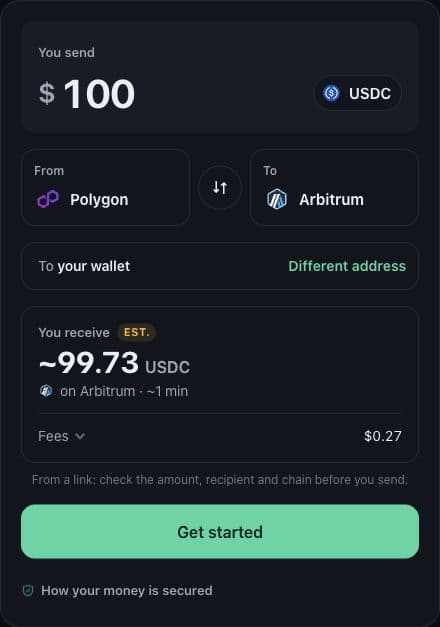
Open a 100 USDC example for Polygon → Arbitrum. The link fills the form only; sign in and review the live quote to continue.
Or ask your AI agent
MCP setup →Connect Claude, Cursor or any MCP client and ask. It moves USDC within limits you set.
- “Move 50 USDC from Polygon to Arbitrum.”
Show the MCP tool call
{
  "name": "swap_chains",
  "arguments": {
    "from": "Polygon",
    "to": "Arbitrum",
    "amount": "50",
    "idempotency_key": "polygon-to-arbitrum-0001",
    "max_fee_usd": 1
  }
}
FAQ
How much does it cost to move $1,000 USDC from Polygon to Arbitrum, and how long does it take?
Moving $1,000 USDC from Polygon to Arbitrum with sendstables has a service charge of $0.50 (0.05% at this amount) plus about $0.08 in Circle fees, about $0.58 combined before operating costs and margin. It arrives as native USDC minted by Circle's CCTP (no wrapped token) and typically takes about 1 minute as a standard transfer (Circle's average attestation from Polygon: ~8 seconds), with no POL needed for gas in a sendstables wallet. Estimates checked Oct 23, 2026; the in-app quote shows our exact fee, Circle's live fee estimate and the guaranteed minimum you'll receive.
How long does it take to move USDC from Polygon to Arbitrum?
It typically takes about 1 minute as a standard transfer (Circle's average attestation from Polygon: ~8 seconds). Times are estimates.
How much does it cost to bridge USDC from Polygon to Arbitrum?
Our fee is 0.05% service charge (min $0.10, no cap) plus operating costs and margin (the cost margin is 30%). Circle's standard fee from Polygon: $0 when checked, plus a small Forwarding Service fee on Arbitrum. The quote shows our exact fee, Circle's live fee estimate and the guaranteed minimum you'll receive before you sign.
Is the USDC I receive on Arbitrum native or wrapped?
Native. CCTP burns USDC on Polygon and Circle mints the same amount on Arbitrum. No wrapped token, no pool, no slippage.
Do I need POL on Polygon or ETH on Arbitrum for gas?
Not with a sendstables wallet: we sponsor the POL gas. A connected EVM wallet pays its own POL gas. Circle's Forwarding Service handles the mint on Arbitrum.
Can I send USDC from Polygon to someone else's Arbitrum address?
Yes. Use the Send tab and paste a 0x… address (any EVM wallet or exchange deposit address that accepts native USDC on Arbitrum). The Swap tab moves USDC between your own wallets.
Is sendstables run by Circle?
No. sendstables is an independent app built on Circle's public CCTP. Circle issues USDC and runs CCTP; we sponsor gas, relay where needed, and charge the fee shown in the quote.
Troubleshooting Polygon → Arbitrum
My USDC balance is missing
Check the sending wallet, selected network (Polygon) and token identifier above. Native USDC on Arbitrum or another network is a separate balance. If you hold a bridged token, this route does not convert it into native USDC for you.
After a recent deposit, check its confirmation in your wallet’s explorer and refresh the app balance.
The address or destination is rejected
Use a 0x… wallet address that can receive native USDC on Arbitrum. The same address format is used on many EVM networks, so confirm Arbitrum with the recipient.
Copy it again from the recipient’s wallet, check the full address and confirm the network. Do not use a token contract, mint or issuer address as the recipient.
The quote changed or I cannot confirm
Review the refreshed quote and the USDC balance on Polygon. Network costs and Circle fees can change, and expired quotes cannot be confirmed.
If you connected an external EVM wallet, it also needs POL on Polygon for source-chain transactions. A sendstables wallet uses sponsored gas.
If a wallet prompt was rejected, check the app’s transfer status before trying again.
The burn confirmed but USDC has not arrived on Arbitrum
Open the existing transfer’s status and explorer links. Delivery follows the source burn, Circle’s attestation and the destination mint; a confirmed burn alone does not mean delivery is complete. Use the app’s status or delivery retry controls when offered.
Avoid starting a second transfer to fix a pending one. Circle explains attestation and finality times.
The transfer says delivered, but my wallet does not show USDC
Check the destination transaction and recipient on Arbitrum. Select Arbitrum in the receiving wallet and, if needed, add the native USDC token identifier above to its display. For an exchange deposit, its own crediting process may still be pending.
For help, keep the route, source transaction hash, destination hash if available and the status or error message. Never share a seed phrase, private key or sign-in code. Contact sendstables support.
Instructions checked 2026-10-15 UTC against the sendstables app. See how transfers are protected and the remaining risks.


